> ## Documentation Index
> Fetch the complete documentation index at: https://mega-cli.mintlify.site/llms.txt
> Use this file to discover all available pages before exploring further.
# Installation and Setup
> Learn how to install the Mega CLI tool
## Prerequisites
Before installing the Mega CLI, ensure you have:
* [Node.js](https://nodejs.org/) (v16 or higher)
* npm, yarn, or pnpm package manager
* [Git](https://git-scm.com/downloads) (required for project initialization)
## Installing the CLI
You can install the Mega CLI globally using your preferred package manager:
```bash theme={null}
# Using npm
npm install -g megaeth-cli
# Using yarn
yarn global add megaeth-cli
# Using pnpm
pnpm add -g megaeth-cli
```
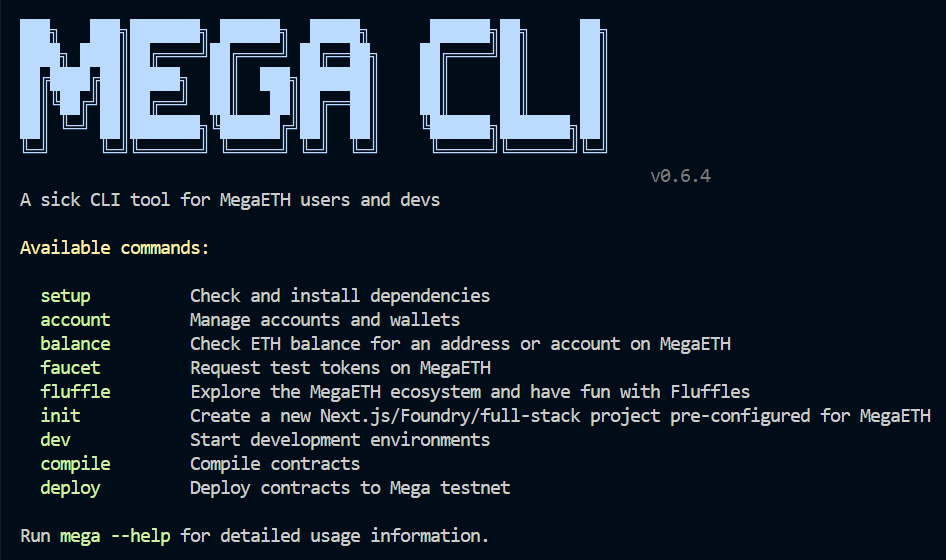
After installation, you can verify that the CLI is properly installed by running:
```bash theme={null}
mega
```
If it was installed correctly, you'll see something like this:
 ## Setting Up Foundry
Mega CLI necessarily requires [Foundry](https://book.getfoundry.sh/) for 3 of its 10 commands. The remaining 7 will work just fine without it.
Foundry is a blazing fast, portable and modular toolkit for Ethereum application development. You can easily install it using the built-in setup command:
```bash theme={null}
mega setup
```
This command will:
* Check if Foundry is already installed
* On Linux/macOS: Automatically install Foundry
* On Windows: Guide you through the manual installation process
To only check if Foundry is installed without attempting installation:
```bash theme={null}
mega setup --check
```
### Manual Foundry Installation
If you prefer to install Foundry manually:
```bash theme={null}
curl -L https://foundry.paradigm.xyz | bash
foundryup
```
1. Install Rust from [https://rustup.rs/](https://rustup.rs/)
2. Install Visual Studio build tools
3. Open a terminal and run:
```bash theme={null}
cargo install --git https://github.com/foundry-rs/foundry --profile release --locked forge cast chisel anvil
```
## Recommended: Setting Up a Local Account
For the optimal experience with MegaETH CLI, it's recommended to set up a local account:
```bash theme={null}
# Create a new account
mega account create
# Verify your account was created successfully
mega account list
```
When creating an account:
1. You'll be prompted to enter a name for your wallet (e.g., "dev")
2. You'll need to set a password to encrypt your wallet
3. The account will be stored in your local keystore
Your account can now be referenced in other commands using the `--account` flag.
## Next Steps
Now that you have installed the MegaETH CLI and set up Foundry, you're ready to:
* [Create your first project](/quickstart)
* [Learn about the available commands](/commands/init)
* [Explore example workflows](/reference/examples)
## Setting Up Foundry
Mega CLI necessarily requires [Foundry](https://book.getfoundry.sh/) for 3 of its 10 commands. The remaining 7 will work just fine without it.
Foundry is a blazing fast, portable and modular toolkit for Ethereum application development. You can easily install it using the built-in setup command:
```bash theme={null}
mega setup
```
This command will:
* Check if Foundry is already installed
* On Linux/macOS: Automatically install Foundry
* On Windows: Guide you through the manual installation process
To only check if Foundry is installed without attempting installation:
```bash theme={null}
mega setup --check
```
### Manual Foundry Installation
If you prefer to install Foundry manually:
```bash theme={null}
curl -L https://foundry.paradigm.xyz | bash
foundryup
```
1. Install Rust from [https://rustup.rs/](https://rustup.rs/)
2. Install Visual Studio build tools
3. Open a terminal and run:
```bash theme={null}
cargo install --git https://github.com/foundry-rs/foundry --profile release --locked forge cast chisel anvil
```
## Recommended: Setting Up a Local Account
For the optimal experience with MegaETH CLI, it's recommended to set up a local account:
```bash theme={null}
# Create a new account
mega account create
# Verify your account was created successfully
mega account list
```
When creating an account:
1. You'll be prompted to enter a name for your wallet (e.g., "dev")
2. You'll need to set a password to encrypt your wallet
3. The account will be stored in your local keystore
Your account can now be referenced in other commands using the `--account` flag.
## Next Steps
Now that you have installed the MegaETH CLI and set up Foundry, you're ready to:
* [Create your first project](/quickstart)
* [Learn about the available commands](/commands/init)
* [Explore example workflows](/reference/examples)